Meta Business Partner · WhatsApp Business
AI WhatsApp campaigns with segmented leads
LIA turns the information it has already recorded about each lead into segments for your WhatsApp campaigns. You choose who to reach, LIA generates the templates and manages their approval with Meta, schedules the sends from the connected numbers and handles every reply according to the configured flow.
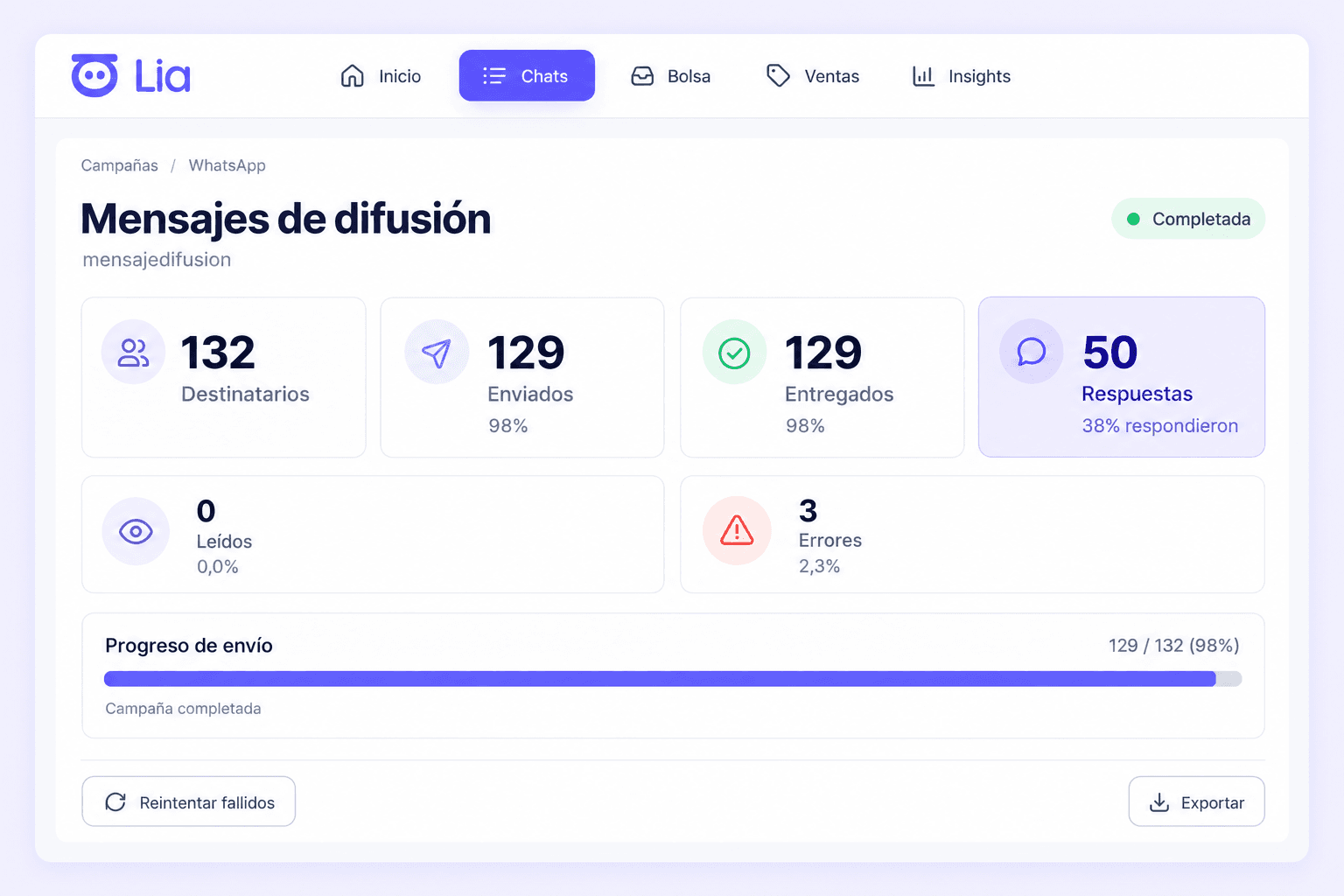
Campaigns built on the sales information you already have
Every conversation that passes through the connected channels leaves information in LIA: which product or interest the lead has, what sales stage they are in, who handles them, when their last activity was. Campaigns use that information to choose recipients with criteria, instead of sending the same message to your whole database.
The process has four parts: select the segment, prepare the template and obtain Meta's approval, schedule the send from the chosen number and handle the replies with the flow your company has defined.
The information segments are built from is what LIA records as a WhatsApp CRM with AI and an AI Sales Manager.
Segmentation: who each campaign reaches
Combine criteria to define the group of leads for each campaign. The selection criteria are independent of the number the campaign is sent from: first you choose who, then where from.
Selection criteria
Rep, team or company
The leads in a rep's portfolio, in a sales team or across the whole company.
Sales stage, tags and lead scoring
The stage each opportunity is in, the tags the team assigned to it and its hot, warm or cold rating.
Detected product or interest
The product or interest LIA identified in each lead's conversation.
Custom customer data
The custom fields your company records for each contact.
Dates and inactivity
Contact dates and time without activity, to reach recent leads or the ones that have stalled.
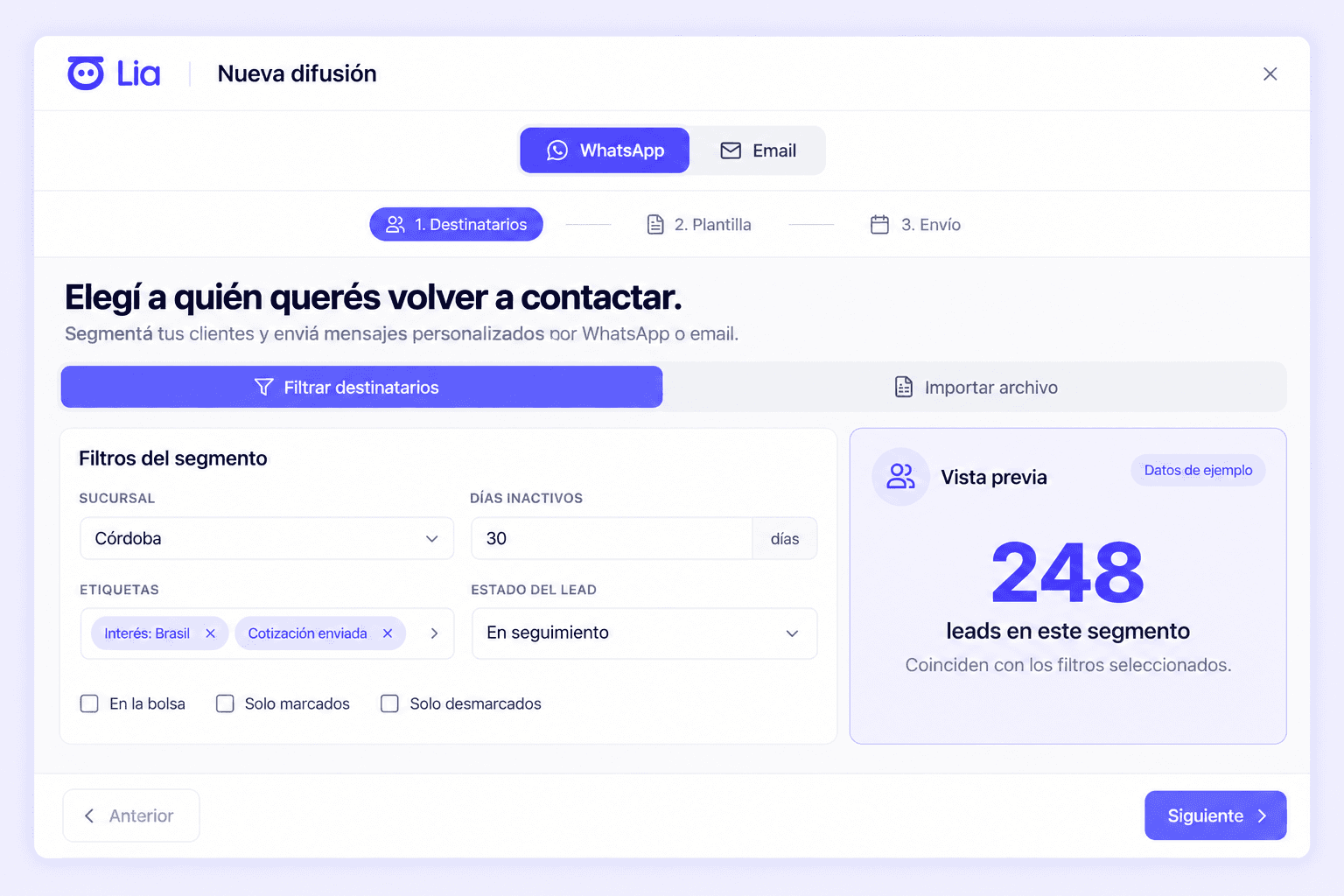
The sending number is a separate decision
Selecting recipients and choosing the sending number are two different settings of the same campaign. In each campaign you can choose to send from the numbers of the reps connected to LIA or from a single connected number. Sends go out with a template approved by Meta.
Templates and sending: generation, Meta approval and scheduling
LIA generates the template content
Based on the campaign goal and the chosen segment, LIA generates the content of the WhatsApp template that will be submitted for approval.
Approval is decided by Meta
LIA manages the submission of the template to Meta to request its approval. Meta is the one that approves or rejects each template according to its policies; LIA cannot guarantee approval.
Scheduling and sending approved templates
Once the template is approved, you schedule the date and time of the broadcast and LIA sends it to the chosen segment from the defined number.
Campaign scope: portfolio, team or company
A campaign can target a rep's portfolio, a sales team or the whole company. With the segment defined, you choose for that campaign whether the send goes out from the connected reps' numbers or from a single connected number.
A rep's portfolio
The segment is one rep's leads. The campaign can be sent from that rep's connected number or from a single connected company number, depending on how it is configured.
Sales team
The segment is a sales team's leads. For that campaign you choose whether each lead receives the message from their responsible rep's connected number or whether the whole broadcast goes out from a single connected number.
Whole company
The segment spans portfolios and teams. The campaign can be sent from the connected reps' numbers or from a single connected number; replies are routed according to the configured flow.
In every case, only numbers connected to LIA can be used as the sending number, and sends go out with a template approved by Meta.
Customer reply: what LIA does when a lead answers
When a lead replies to a campaign, LIA interprets the message and triggers the configured handling flow. Flows can take into account the customer's reply, the campaign's product and your company's business rules.
Reply with AI
LIA can continue the conversation automatically, interpret what the customer needs and qualify the opportunity.
Hand the conversation back to the responsible rep
The reply can go back to the rep who was already handling that lead, with the full conversation and history.
Route to another rep or to a lead pool
Depending on the configured rule, the lead can be routed to another rep or to a lead pool so the right person picks it up.
Update the stage and lead scoring
The reply updates the lead's sales stage and rating, which stay available for follow-up and for future campaigns.
Which action applies in each case depends on the flow your company has configured for that campaign.
Once the reply is routed, LIA supervises that lead's follow-up per rep, as explained in AI sales rep follow-up.
Illustrative example: re-engaging inactive leads for a product
Fictional example. It does not correspond to a real customer or describe results; it shows the path of a campaign with the criteria and flows a company could configure.
1. Selecting the segment
A company wants to get back in touch with the leads who asked about a product and never wrote again. It selects the leads with that detected product or interest, with more than 30 days without recorded activity and belonging to a sales team.
2. Preparing the template
LIA generates the content of a template to resume contact about that product and manages its submission to Meta to request approval.
3. Scheduling the send
With the template approved by Meta, the company schedules the broadcast for a day and time and chooses the sending number for that campaign: in this case, from the connected numbers of the reps responsible for those leads; it could have chosen a single connected number.
4. Handling the replies
When a lead replies, LIA applies the flow configured for that campaign: it can reply with AI to resume the conversation, hand it back to the responsible rep with the full history and update that lead's stage and lead scoring.
Pricing and rollout
LIA's price depends on lead volume and the level of follow-up each business requires, with no charge per number of users, reps or connected channels.
The terms are in pricing and rollout of LIA's WhatsApp CRM.
Let's see what a campaign would look like for your company
In a demo we talk about your operation: which products you sell, how your team is organised and which leads you would want to contact again. With that, we show you how a campaign would be set up in LIA.
See how it would work in my company